MySpec Open Beta Extended Through November 2026: What's New in This Update
MySpec's Open Beta is extended through November 2026, giving users more time to explore the latest updates. Discover more flexible spec generation, enhanced team collaboration, actionable task management, deeper MCP and IDE integrations, and improvements to documentation and administration.
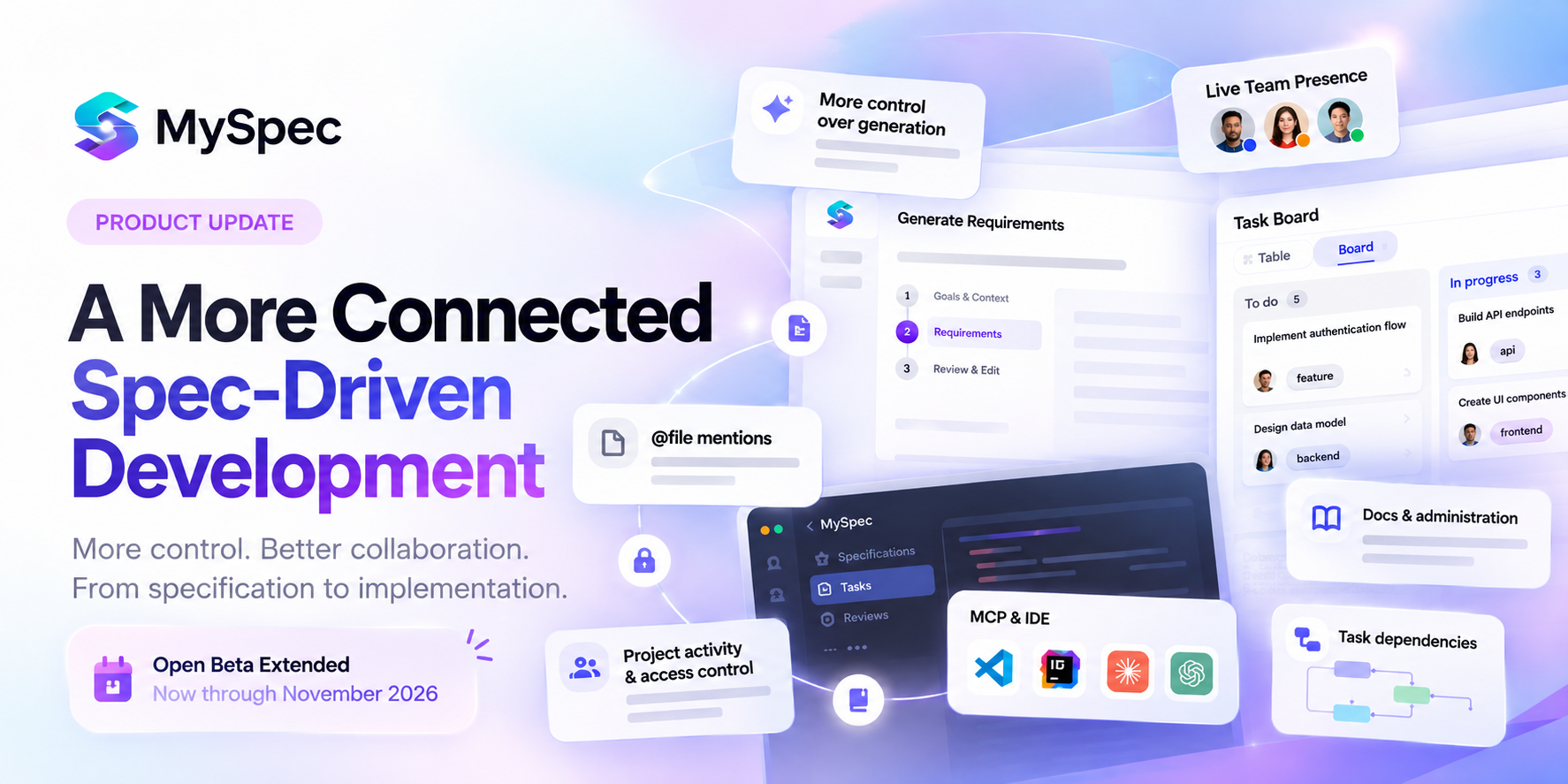
MySpec continues to evolve, building on its Spec-Driven Development foundation to connect planning, collaboration, and implementation more closely.
With the Open Beta extended for another month into November 2026, users have more time to explore the latest improvements. From more flexible specification generation and enhanced project collaboration to actionable task management and deeper integration with development tools, these updates bring MySpec closer to a connected development workflow.
Let's take a closer look at the Open Beta extension and what's new in MySpec.
Open Beta Extended Through November 2026
Good news! MySpec's Open Beta has been extended for another month, through November 2026.

With the latest updates bringing more flexibility to specification generation, improved collaboration, and closer integration with development tools, this extension gives users more time to explore MySpec's evolving capabilities and try the new features in their own projects.
Whether you're starting a new project or refining an existing one, now is a great time to experience MySpec's Spec-Driven Development workflow.
Explore MySpec and join the Open Beta.
- Spec Generation: More Control, Clearer Specifications
1.1. The Right Level of Detail for Every Project
Not every project requires the same level of planning. A small feature may only need a few clarifications, while a complex system often requires deeper exploration of requirements, constraints, and technical decisions.
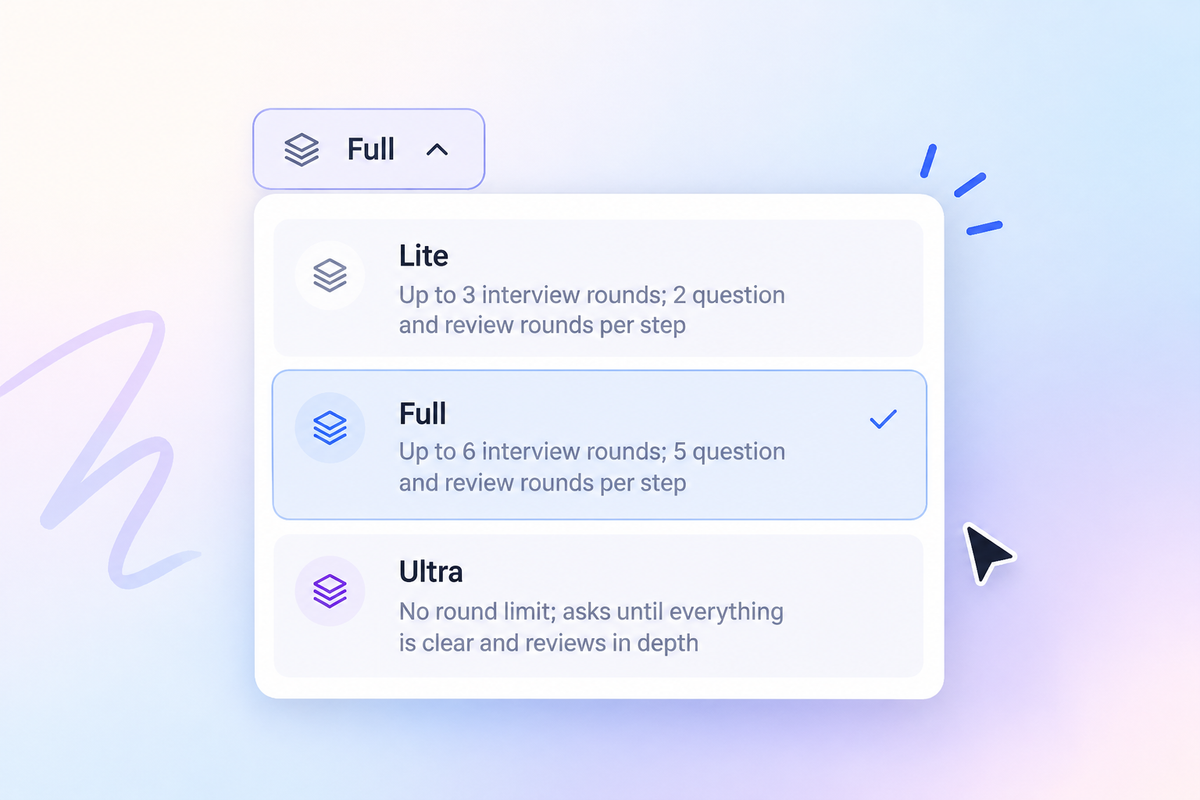
Building on MySpec's existing AI-guided interview and review process, the new Spec Depth Levels give users more control over how thoroughly their project is explored before they finalise specifications.
Users can now choose between three levels directly alongside their preferred AI model:
- Lite: A more streamlined process with fewer questioning and review rounds, suited to straightforward requirements.
- Full: A more comprehensive approach with additional opportunities to clarify requirements and refine specifications.
- Ultra: The most thorough option, allowing MySpec to continue asking questions until outstanding ambiguities are resolved.
Rather than applying the same planning process to every project, MySpec adjusts the depth of its interviews and reviews to the selected level. This helps users balance the time spent defining requirements with the level of detail their project needs.
The result is a more flexible specification workflow, whether users are planning a focused update or working through the complexities of a larger software project.
1.2. Keeping Specifications Focused on What Matters
A detailed specification does not necessarily need a complex technical solution. What matters is whether the proposed approach matches the project's actual requirements, expected usage, and constraints.
MySpec's latest improvements to specification generation place greater emphasis on this distinction. In both MySpec and Enterprise workflows, specifications are now designed to include only the components and technical decisions that the requirements justify, rather than introducing unnecessary architecture or complexity.
To make these decisions more transparent, generated specifications also explicitly address three important considerations:
- Expected load: The anticipated usage or workload that the proposed solution needs to support.
- Deliberate shortcuts: Practical simplifications or trade-offs made intentionally within the project's constraints.
- Out-of-scope items: Features, capabilities, or technical considerations that are not included in the current implementation.
By documenting these boundaries, MySpec helps teams distinguish between what is necessary now and what may be considered later. This gives developers and AI coding agents clearer implementation context without treating every project as though it needs an enterprise-scale solution.
The goal is not simply to produce shorter specifications, but to create specifications that are appropriately scoped, technically grounded, and practical to implement.
1.3. Making Technical Specifications Clearer and More Consistent
A well-structured specification is only useful when its requirements and technical decisions can be understood consistently by everyone working on the project. Ambiguous language, overly complex sentences, or inconsistent terminology can make even detailed documentation difficult to interpret.
To improve clarity, MySpec now applies Simplified Technical English (ASD-STE100) to specifications and AI-generated responses in English-language sessions. This controlled language standard encourages clear, concise technical writing through consistent terminology and simplified sentence structures.
For teams working across product planning, engineering, and quality assurance, this means specifications can communicate requirements more precisely without relying on unnecessarily complicated wording. It also provides AI coding agents with more consistently expressed instructions when those specifications are used as implementation context.
By making technical language more predictable and easier to follow, MySpec strengthens the connection between what a specification describes and how its requirements are understood during development.
1.4 More Flexibility with Claude Haiku 5.5
MySpec continues to expand its AI model lineup with Claude Haiku 5.5, giving users another option for specification generation and planning workflows.

Claude Haiku 5.5 joins MySpec's existing selection of Claude, GPT, and Gemini models, providing greater flexibility when choosing a model based on project complexity, response speed, and cost. With support for long-context pricing, it also offers a pricing structure for workflows that involve larger amounts of project context.
Recommended for MySpec Workflows
- Greenfield projects with straightforward requirements and focused planning needs.
- Brownfield workflows involving targeted updates and incremental changes.
- Requirements drafting, clarification, and iterative specification refinement.
- Users who want to balance model cost with the needs of their specification workflow.
Official Model Information
Claude Haiku 5.5 by Anthropic.
2. Projects & Collaboration: A More Connected Workspace for Teams.
2.1. Bringing Everything Together in One Project Workspace
As specifications evolve, the conversations, decisions, and tasks surrounding them become just as important as the documents themselves. Keeping these activities connected helps teams maintain a clearer understanding of their project's progress and context.
Building on MySpec's existing project management and collaboration capabilities, the updated Project Workspace introduces a more organized experience, bringing essential project activities together through five dedicated tabs:
- Home: A central overview of the project, including an activity feed that highlights recent updates and identifies the specification bundle associated with each file.
- Chats: A dedicated space for project conversations and AI-assisted work.
- Discussions: A place to organize project-related discussions and collaboration.
- Tasks: Direct access to the project's task management workspace.
- Settings: A dedicated area for project configuration and management.
Rather than navigating between separate parts of the workflow, users can now access project information, conversations, discussions, and tasks from a consistent structure.
This update also lays the foundation for closer team collaboration, making it easier to follow project activity and understand how work progresses across different specifications and contributors.
2.2. Better Visibility Into Team Activity and Collaboration
Collaboration becomes more effective when team members can see what is happening across a project without constantly checking for updates or asking others about their progress.
MySpec previously introduced Live Presence to help teams see who was viewing the same specification and stay connected during collaborative work. The latest updates extend this visibility beyond individual documents, making it easier to follow team activity as work progresses.
The enhanced collaboration experience now includes:
- Project Activity Feed: Displays recent project activity on the Home page, with each file identified by its specification bundle to provide clearer context.
- Live Team Presence: Shows team members' names alongside their activity, making it easier to recognize who is involved in ongoing work.
- Running Turn Visibility: Lets teammates see when others have AI turns in progress.
- New Turn Notifications: Displays a banner when a new turn becomes available, helping users stay aware of ongoing conversations.
- Away Detection: Provides additional presence information to distinguish between active and inactive team members.
Together, these improvements make project activity more visible and help teams coordinate their work with less uncertainty about what others are doing.
Rather than limiting collaboration to comments and document reviews, MySpec now provides greater awareness of the people and activities involved throughout the project workflow.
2.3. Keeping Project Activity, Access, and Context Connected
As projects grow, keeping everyone aligned requires more than a shared workspace. Teams need to understand how work is progressing, manage who can access project resources, and easily reference the information behind ongoing discussions.
To improve project visibility, MySpec introduces a new Activity Feed on the project Home page. It brings project activity into one place, making it easier to follow updates without navigating through individual files. Each file entry also identifies its associated specification bundle, helping users understand which part of the project the activity relates to.
Alongside this, role-based project permissions provide more control over team access. Rather than relying solely on organization-level membership, access can now be managed at the project level according to assigned roles, creating clearer boundaries for collaboration.
MySpec also introduces searchable @file mentions, allowing users to find and reference project files by their paths. This makes it easier to bring relevant documents into conversations without manually searching for or repeatedly explaining where information is located.
Together, these improvements help teams stay informed about project activity, maintain appropriate access to shared resources, and keep discussions connected to the right project context.
3. Task Board: Turning Specifications Into Actionable Work
3.1. From Specification Tasks to a Visual Task Board
In MySpec, implementation planning has long been part of the specification process. Through workflows such as Greenfield, project requirements and technical decisions can be translated into actionable tasks documented in tasks.md, giving developers a structured starting point for implementation.
The new Task Board takes this a step further by turning those tasks into an interactive workspace where teams can organize, track, and manage development work directly within MySpec.
Users can work with tasks through two complementary views:
- Table View: A structured overview for reviewing task details, filtering work, and making updates across multiple tasks.
- Board View: A visual way to organize tasks and follow their progress throughout the development process.
The Task Board also supports filters, bulk editing, and task assignees, making it easier to focus on relevant work, update multiple items efficiently, and clarify responsibility across the project.
Instead of treating tasks.md solely as an implementation checklist, MySpec now makes its contents directly manageable. This creates a more practical connection between the work defined during specification and the tasks teams need to carry out during development.
3.2. Make Task Updates More Controlled with Drafts
Managing development tasks often involves several related changes. A team may need to update task details, adjust assignments, or reorganize work before those changes are ready to be applied.
To support this process, MySpec introduces Drafts for task management. Rather than submitting every edit immediately, users can stage multiple task changes and submit them together when ready.
This provides a more deliberate way to manage task updates, particularly when several adjustments are part of the same planning decision. Teams can prepare their changes before committing them, keeping task management more organized as project requirements and priorities evolve.
With Drafts, the Task Board supports not only tracking existing work but also refining how that work is organized over time.
3.3. Understand How Tasks Connect with Dependencies
Development tasks rarely exist in isolation. Some work must be completed before another task can begin, while other tasks are connected through shared requirements or technical considerations.
MySpec now supports task relationships, making these connections explicit within the Task Board:
- Blocks: Identifies a task that prevents another task from progressing until it is addressed.
- Blocked by: Shows which task a particular piece of work depends on.
- Related to: Connects tasks that share relevant context without necessarily requiring a specific execution order.
These relationships help teams understand dependencies and identify how individual tasks fit into the broader implementation plan.
Task relationships are also supported through MCP and MySpec's Edit agent, allowing dependency information to remain available beyond the visual board itself.
By making task relationships explicit, MySpec helps teams move from a collection of implementation tasks toward a more connected view of the work required to deliver a project.
4. MCP & IDE: Bringing MySpec Closer to Development Tools
MySpec has continued to expand its MCP capabilities to connect specification planning with AI-assisted development. Previous updates introduced features such as starting specification sessions from connected AI agents, accessing review discussions, and following project changes through live event streams. Building on these integrations, the latest release makes connecting and working with MySpec more accessible. OAuth authentication for MCP connectors, including Claude and ChatGPT, now provides a sign-in flow, consent page, and Connected Apps section for managing connections. MySpec also introduces a VS Code extension and JetBrains plugin, both supporting staged task changes, bringing task-related workflows into familiar development environments. Additionally, the new auth status CLI command allows users to check their authentication status from the command line. Together, these improvements extend MySpec's existing MCP foundation, making it easier to connect AI tools, manage authentication, and work with project tasks across development environments.
5. Docs & Administration: Improving Accessibility and Organization Management
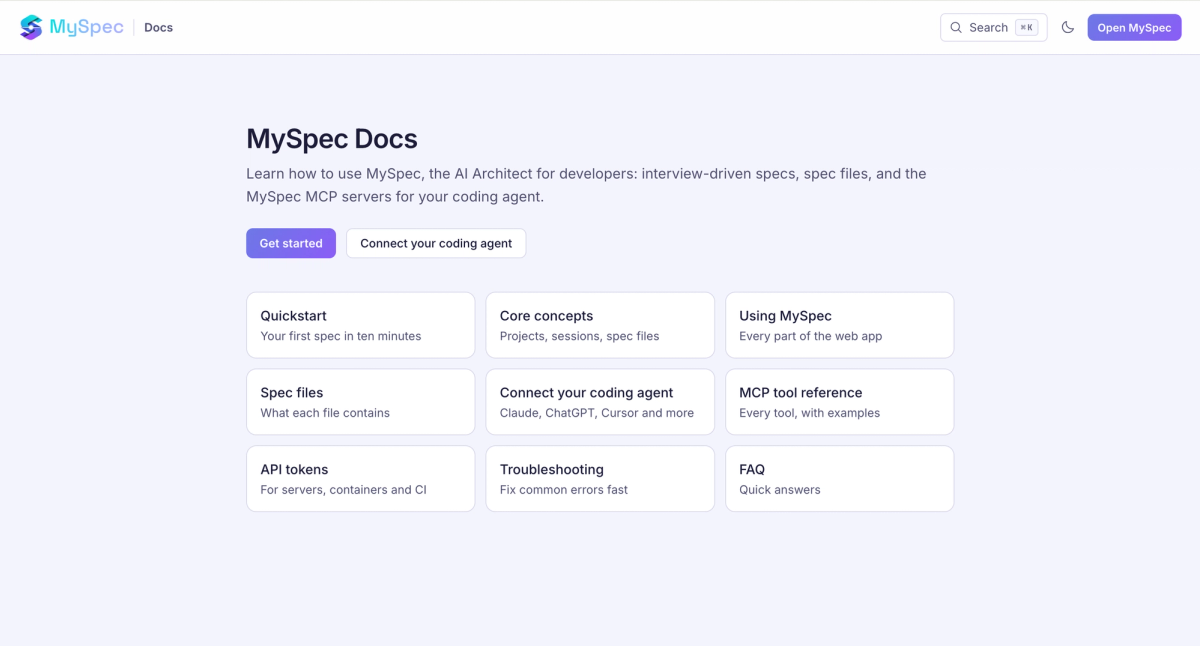
Alongside improvements to development workflows, MySpec is making it easier for users to get started, access resources, and manage organizations. The new public documentation site provides a dedicated place to explore MySpec's features and workflows. The onboarding experience now includes a role selection step and organization switching, giving users more flexibility when setting up and navigating their workspaces. On the administration side, the updated Admin Portal supports creating organizations for designated owners, brings organization management into a unified Organisations tab, and introduces session search. Together, these updates improve access to product information and simplify key onboarding and administrative processes.
Looking Ahead: A More Connected Development Workflow
These updates mark another step in MySpec's evolution toward a more connected Spec-Driven Development workflow. By giving users greater control over specification generation, bringing project collaboration and task management closer together, and expanding integration with development tools, MySpec helps teams carry their project context from planning into implementation.
As MySpec continues to evolve, the focus remains on making specifications more practical, collaborative, and actionable throughout the development process. With the Open Beta extended into November 2026, users have more time to explore these improvements and experience how MySpec supports their development workflows.
Explore the latest features and start building with greater clarity at Myspec